FAQs
Listed below are some of the most Frequently Asked Questions that we have within our site. Used in conjunction with the CTO User Guide, most questions should be covered. If not, please contact the helpdesk at 800-493-4142 or
support@tbccorp.com.
-
Click the reset password link on the login page. After you provide your username and the answers to your security questions, you will be allowed to change your password. If you do not remember your username or the answers to your security questions, then contact the helpdesk at 800-493-4142 or
support@tbccorp.com.
-
If you have forgotten both your username and password, then you will need to contact
the helpdesk at 800-493-4142 or
support@tbccorp.com.
-
You can get started by clicking on the "Register" button on the login page of the application. Fill out the form and submit your information, and we will contact you about setting up your account.
-
All you need to get started is your Carroll Tire account number and a temporary password that your local warehouse will provide to you upon request. Once you have your temporary password, click the "Set up my account" button on CTO's login page. Click here for a warehouse phone directory.
-
After logging in to CTO, you can search for Tires via the Quick Search Size or Quick Search Part# section on the right hand side of your screen. If you need a more advanced search, click on the Tires tab at the top of the screen, which will take you to the Advanced Tire Search screen .
-
After logging in to CTO, you can search for Wheels via the Quick Search Size or Quick Search Part# section on the right hand side of your screen. If you need a more advanced search, click on the Wheels tab at the top of the screen, which will take you to the Advanced Wheels Search screen.
-
After logging in to CTO, you can search for Tubes via the Quick Search Size or Quick Search Part# section on the right hand side of your screen. If you need a more advanced search, click on the Tubes tab at the top of the screen, which will take you to the Advanced Tubes Search screen.
-
After logging in to CTO, you can search for Accessories via the Quick Search Part # section on the right hand side of your screen. If you need a more advanced search, click on the Accessories tab at the top of the screen, which will take you to the Advanced Accessories Search screen.
-
After logging in to CTO, you can quickly search your Order History by clicking on the Order History tab at the top of the screen. Here you can search by Invoice Number or Date Range, and view the PDF version of your invoice.
-
After logging in to CTO, you can view the Current Promotions by clicking on the Current Promotions tab at the top of your screen.
-
This typically occurs when your account is missing information that is needed to complete your order. The most common missing information is tax information. Please contact the helpdesk at 800-493-4142 or support@tbccorp.com if this problem occurs so that we can check your account setup.
-
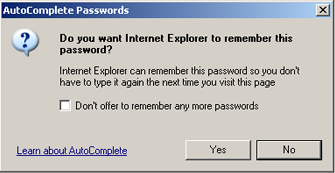
Internet Explorer
When entering your password the first time on this site your browser will prompt you to remember your username and password. Select "Yes" to enable this.
FireFox
When entering your password the first time on this site your browser will prompt you to remember your username and password. Select "Remember" to enable this.

|